How to Select Broadcast Audience
If the checkbox is selected, the broadcast will not be sent to recipients who have previously clicked the unsubscribe button after receiving a message in a specific WhatsApp channel.
How to Add Buttons to WhatsApp TemplatesWhen creating or editing a broadcast, you can add an audience in two ways:
- Select recipient tags
- Add new recipients
-
Go to the second step, Broadcast audience, and select a group of recipients in one of the two blocks:
- Include recipients with these tags — tags assigned to recipients who should be included in the broadcast.
- Exclude recipients with these tags — tags assigned to recipients who should be excluded from the broadcast.
How to Edit the Recipient's CardwarningThe Black list tag cannot be deleted. Recipients with this tag will not receive broadcasts from your edna Pulse personal account.
-
Select the condition for recipients to be included in the group:
- AND — to be included in the group, recipients must have all tags selected for the group assigned to them.
- OR — to be included in the group, recipients must have at least one tag selected for the group assigned to them.
-
In the tag tree on the left, select tags for the group.
infoAll recipients from the Audience section who have been assigned the selected tags are automatically added to the group.
How to Add a Broadcast Recipient -
(Optional) Click Add another group in the Include recipients with these tags or Exclude recipients with these tags block to add additional groups of recipients to be included in or excluded from the broadcast.
-
Click Save to save the draft broadcast, or Continue to proceed to content configuration.
How to Configure Broadcast Content
Example of setting up an audience by recipient tags
For example, you want to include all recipients tagged with Football in the broadcast, but you want to exclude all those with the system tag <18:
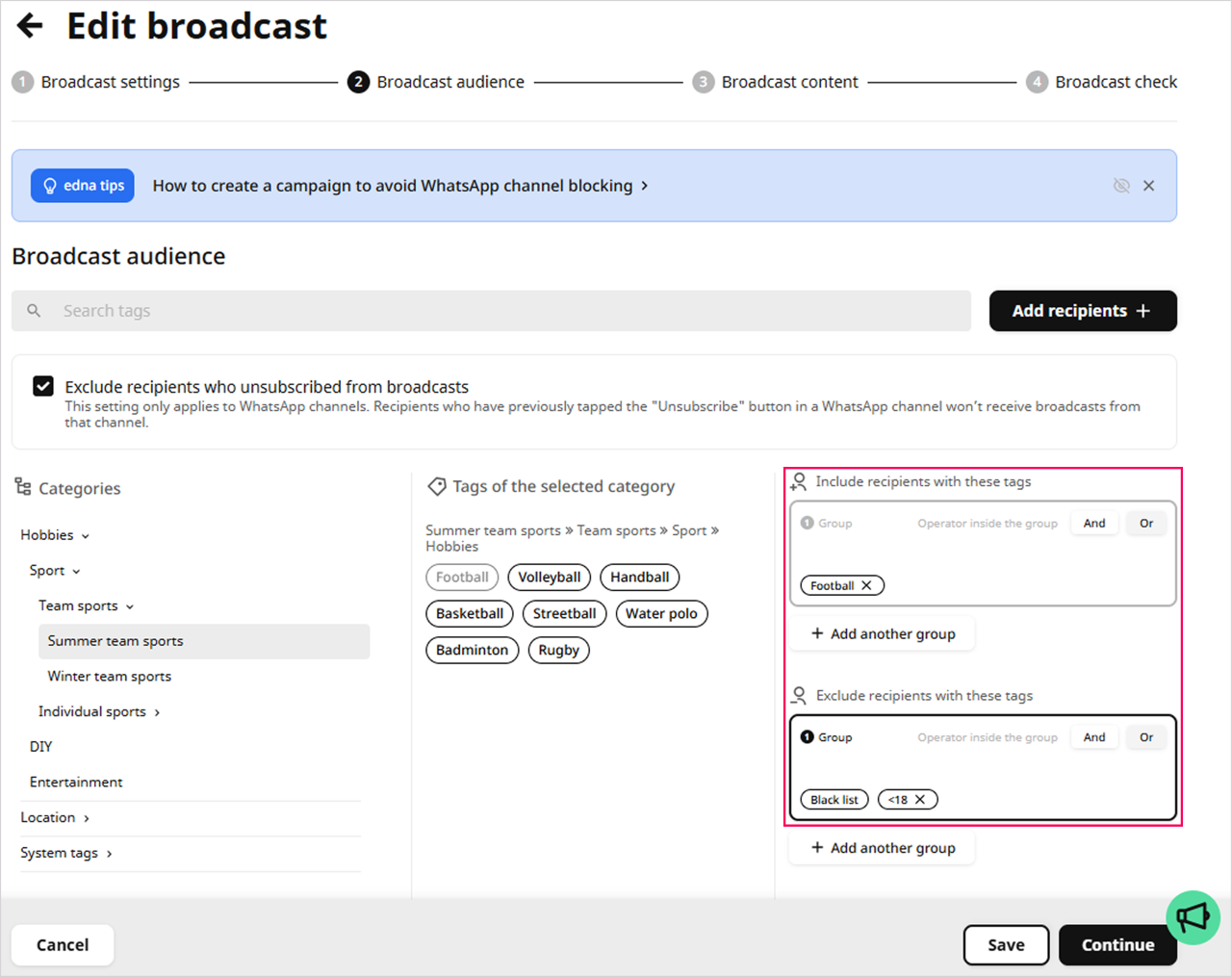
In this example, the broadcast will be sent to all recipients over the age of 18 who have been assigned the Football tag.
-
Prepare an XLSX file with a list of recipients. The maximum file size is 200 MB.
Requirements for filling out the file
-
In a separate column, specify the full phone numbers of recipients with the international country code.
tipRecipient phone numbers can be specified in one of the following formats:
+X-YYY-ZZZ-ZZ-ZZ,+X YYY ZZZ ZZ ZZ,+XYYYZZZZZZZ, where+Xis the international country code,YYYis the city or mobile operator code, andZZZ-ZZ-ZZis the subscriber number.The number of characters in codes and subscriber numbers depends on the country and mobile operator.
-
Specify only one recipient characteristic in each column.
For example, the recipient's full name consists of three different characteristics and three different columns: last name, first name, and middle name.
-
Do not use column headers.
-
Specify dates in one of the following formats:
dd.mm.yy,dd.mm.yyyy;dd/mm/yy,dd/mm/yyyy;dd-mm-yy,dd-mm-yyyy,mm-dd-yy,mm-dd-yyyy,yy-mm-dd,yyyy-mm-dd.
tipIn edna Pulse, dates will be recognized in the same order as listed above.
-
Specify the gender of recipients in one of the following formats:
- male gender —
male,m; - female gender —
female,f.
- male gender —
-
-
Go to the second step, Broadcast audience, and click Add recipients → Attach file.
-
Select the prepared file with the list of recipients, click Upload, and wait for the file to upload.
-
(Optional) From the drop-down list, select the tags you want to assign to all recipients in the list.
infoWhen uploading a file with a list of recipients, edna Pulse automatically adds a tag consisting of the name of the processed file, the date and time of upload in the format
filename_dd-mm-yyyy_hh:mm. -
Assign the appropriate variables to the headers of each column (for example, First Name, Last Name, Phone) or click Add Variable if there is no suitable variable in the drop-down list.
Recipient Variables How to Upload a List of RecipientswarningBe sure to assign the Phone variable to the column with the recipients' phone numbers.
-
Click Continue and choose where to place the recipients: Add to broadcast list or Exclude from broadcast list.
-
Click Continue.
-
Click Save to save the draft broadcast list, or Continue to proceed to content configuration.
How to configure broadcast list content