Placeholders in WhatsApp Templates
You can use placeholders (strings of characters) in WhatsApp operator templates. In a custom template that is based on a registered operator template, you can enter a specific value of a placeholder when setting up a broadcast. It can be any combination of words, numbers, symbols (except &), and spaces or a variable. Use variables to make your messages more personal, for example, address clients by name or mention their pet’s name.
To add such a placeholder to a template, click anywhere in the Template text box and click the <I> button.
Example of template text
The text of a WhatsApp template cannot begin or end with a variable. Only add variables in the middle of the text — this prevents errors when registering the template.
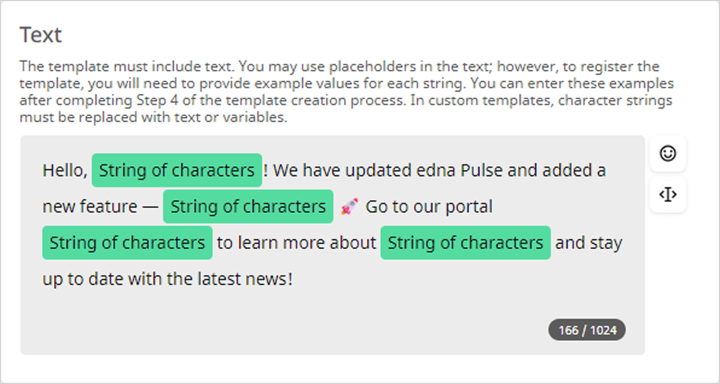
Example of text that fits this template:
Hello,
Alexander! We have updated edna Pulse and added a new feature —run automation scripts🚀 Go to our portalhttps://docs-pulse.edna.io/blogto learn more aboutscriptsand stay up to date with the latest news!
Compose the template text in such a way that the Meta moderator can intuitively understand what the string of characters will be replaced with in the actual message.
Do not add several lines of characters in a row without context — such a template may not pass verification.
Correct template text
We are pleased to inform you that your reservation at the String of characters hotel for the dates String of characters has been confirmed. Please remember that you will need your passport to check in!
Incorrect template text
String of characters your order String of characters String of characters. You can String of characters from String of characters