Managing API Keys for Integration with the edna Pulse API
Make sure the API keys you use are correct, otherwise you won't be able to use the edna Pulse API.
How to Generate or Update Master API Key
-
Go to the Integration → Settings → Main profile tab.
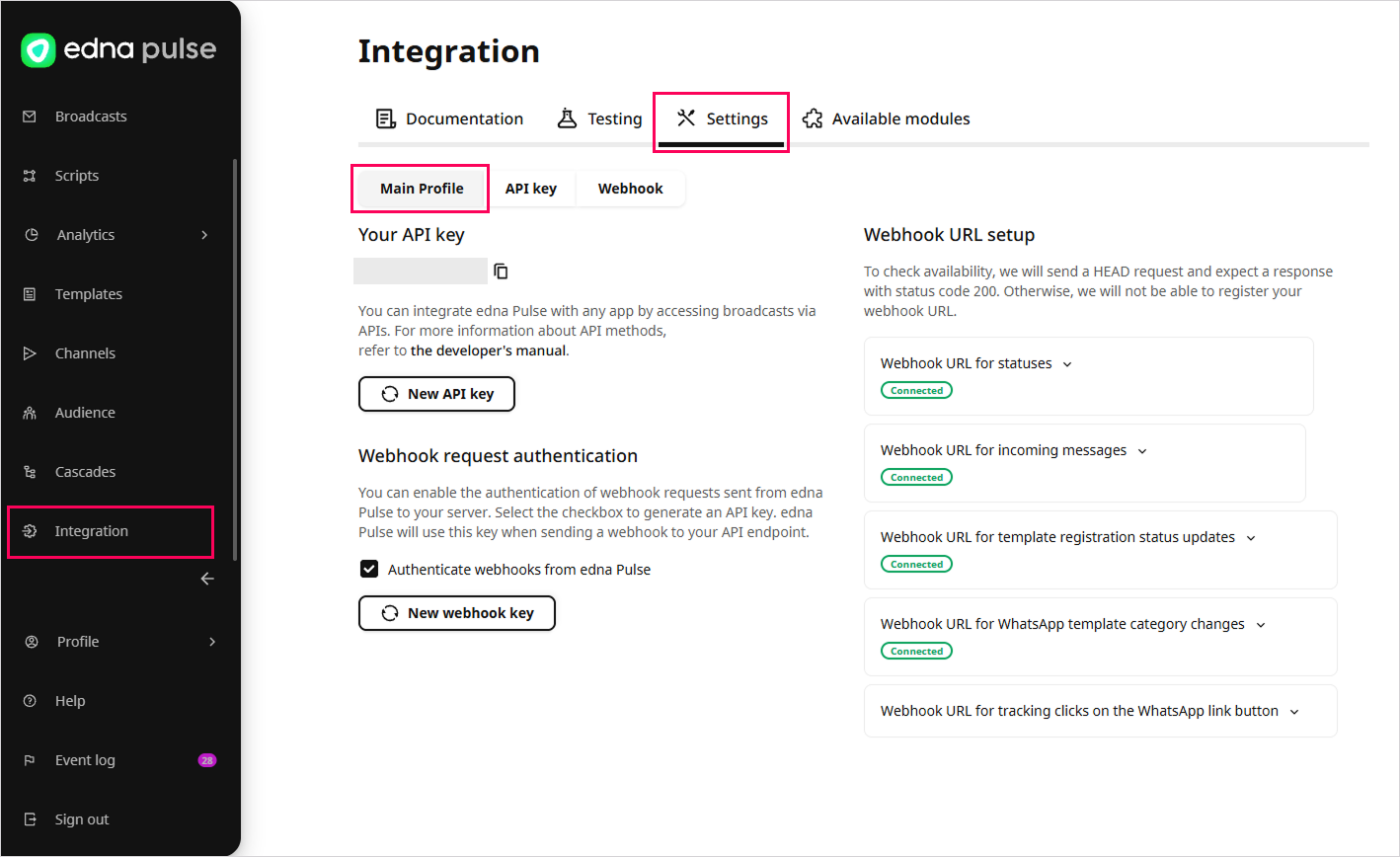
-
In the Your API Key section:
-
Click Generate API Key to obtain the master key for initial use.
-
Click New API Key and confirm the action to update the current master key.
warningWhen you update the master API key, interactions using the old key will stop.
-
-
Copy the new API key and use it to ensure proper operation.
For security reasons, the API key is hidden. To copy the entire key, click the copy icon.
How to Generate Additional API Key
-
Go to the Integration → Settings → API Key tab.
-
Click Generate.
-
Enter a name for the API key.
-
(Optional) Set the API key’s expiration date:
- Unlimited: a permanent API key (default option);
- Valid until: select the last day the API key will be valid.
-
The Senders dropdown list displays the internal names of connected channels with the status
Correct: select one or more channels to be linked to this API key. edna Pulse Channels -
Select one or more groups of API methods that will be available with this API key. Available groups:
- messaging;
- read receipts;
- message history;
- templates;
- webhooks;
- channels;
- cascades;
- scenarios.
-
Click Save.