How to Activate Marketing Messages API for WhatsApp
Starting February 1, 2026, the price for WhatsApp marketing messages will increase by 6% for those who have not yet activated the Marketing Messages API for WhatsApp in their WhatsApp Manager account.
To save money next year, take a couple of clicks now, it will take no more than 5 minutes.
Before its official release, the Marketing Messages API for WhatsApp was called the Marketing Messages Lite API.
What is the Marketing Messages API
The Marketing Messages API for WhatsApp is is Meta's intelligent delivery service that targets broadcasts exclusively to users most likely to engage with them. The algorithm evaluates user behavior—open rates, click-through rates, user complaints—and delivers your marketing messages to high-engagement segments.
Key Benefits
- Pay for high-performance messaging only.
- Improved conversion rates.
- Reduced complaints and account restrictions.
- Higher message delivery rates.
How to Enable the Marketing Messages API
-
Log in to Business Manager and go to the Accounts → WhatsApp Accounts section.
tipTo quickly go to the WhatsApp Accounts section, use the direct link.
-
Select the WhatsApp account for which you want to enable Marketing Messages API.
-
Click WhatsApp Manager and go to the Overview section.
tipTo quickly go to the Overview section, use the direct link.
-
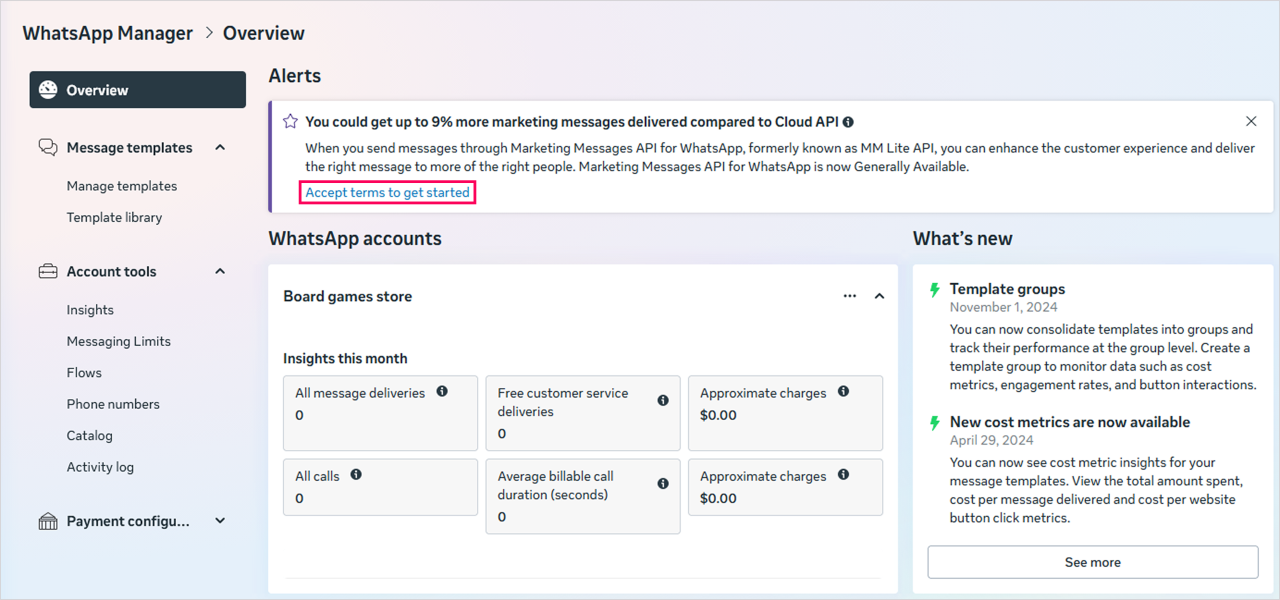
In the Alerts section, click Accept terms to get started.
infoIf the notification you need isn't in the Overview section, go to Message Templates → Manage Templates and click Accept terms to get started in the notification area.
To quickly go to the Manage Templates section, use the direct link.
-
Read the Marketing Messages API terms of servise and click Accept.

Geographic Restrictions
Some advanced features of Marketing Messages API are unavailable in particular geographies due to Meta policy or local regulation:
- European Economic Area;
- United Kingdom;
- Japan;
- South Korea;
- United States of America;
- Russian Federation.
Businesses in these regions are not eligible to onboard and messages cannot be sent to a consumer in these regions. This policy is in place across all Business Messaging APIs:
- Cuba;
- Iran;
- North Korea;
- Syria;
- Crimea, Donetsk, Lugansk.
Additional information
You can find more detailed information about Marketing Messages API in our documentation.
Marketing Messages API for WhatsApp