Marketing Messages API for WhatsApp
The Marketing Messages API for WhatsApp is a new solution for marketing messages designed to improve the quality of service for recipients and achieve better results for businesses through optimizations on Meta's side.

Key Benefits
- Increase in the number of marketing messages delivered and read.
- Improved service quality and recipient engagement.
- Ability to set more dynamic limits on the number of messages, so marketing messages with high engagement levels can reach more recipients.
- Budget savings by increasing the effectiveness of mailings.
- Increased stability of marketing broadcasts.
- Fast and stable processing of your messages under high loads.
When using the Marketing Messages API, Meta decides whether to deliver the message to the end recipient.
Connection Requirements
-
The company must comply with applicable legal restrictions, as well as restrictions outlined in WhatsApp Business Messaging Policy.
-
WhatsApp Business Account is active and not restricted from messaging due to any violations.
-
The country of the business owner and WhatsApp Business Account is not in sanctioned regions.

The Marketing Messages API requirements and policies are regularly updated to comply with various international rules and regulations, refer to the current version on the Facebook website.
Geographic Availability of Features
Some advanced features and reporting capabilities of Marketing Messages API for WhatsApp are available only in particular geographies due to Meta policy or local regulation.
How to Enable Marketing Messages API
-
Log in to Business Manager and go to the Accounts → WhatsApp Accounts section.
tipTo quickly go to the WhatsApp Accounts section, use the direct link.
-
Select the WhatsApp account for which you want to enable Marketing Messages API.
-
Click WhatsApp Manager and go to the Overview section.
tipTo quickly go to the Overview section, use the direct link.
-
In the Alerts section, click Accept terms to get started.
infoIf the notification you need isn't in the Overview section, go to Message Templates → Manage Templates and click Accept terms to get started in the notification area.
To quickly go to the Manage Templates section, use the direct link.
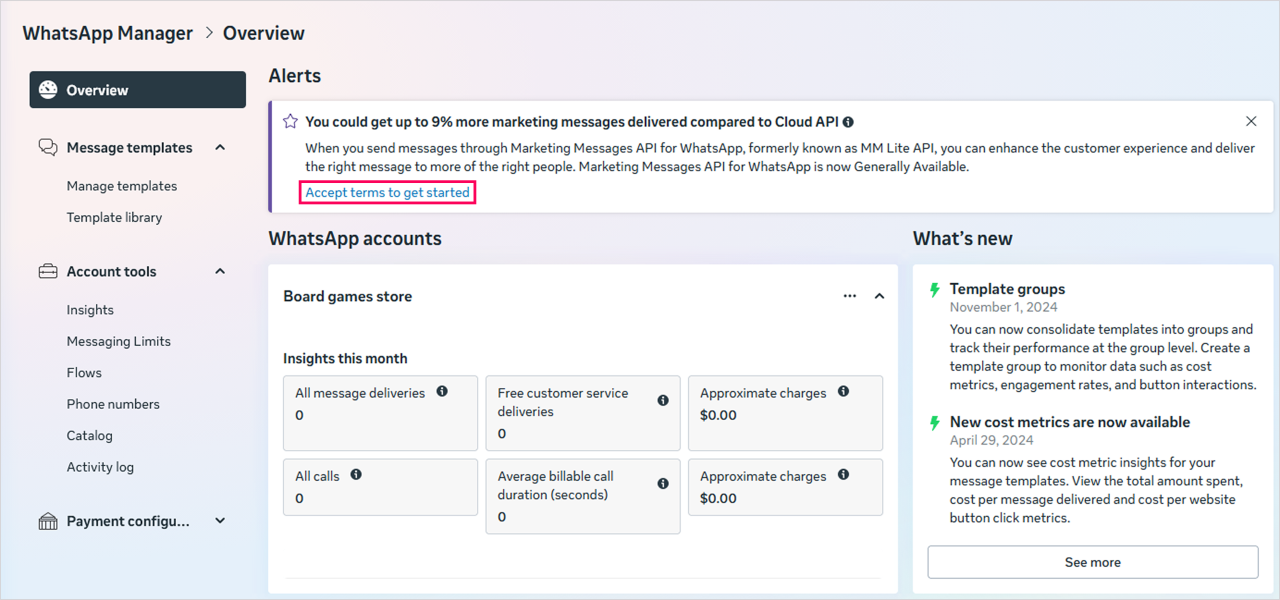
-
Read the Marketing Messages API terms of servise and click Accept.

To use the Marketing Messages API, move the WhatsApp Business Accounts from the On-Behalf-Of category to Shared.
If a client does not accept Meta's updated policy and attempts to send a message via the Marketing Messages API with optimization, WhatsApp will return an error 134102: mrkt-onboarding-or-syncing-incompleted - account did not accept the updated Meta policy or template synchronization error.
How to Disable Marketing Messages API Optimization
-
Log in to Business Manager.
-
Go to the WhatsApp Accounts section.
-
Select the WhatsApp account for which you want to disable optimization.
-
In the Privacy and data sharing section, turn off the Optimize marketing messages by sharing event activity with Meta setting.